Showing posts with label Tablet. Show all posts

Wednesday, April 4, 2012

Samsung Galaxy Tab 7.0 Plus


Samsung Galaxy Tab 7.0 Plus 16GB (Dual Core, Universal Remote, WiFi)

Introduction:

Hard to believe it, but it has been only a year since the Samsung Galaxy Tab came knocking on our doors bringing Android into the tablet market. In that short time, we’ve surely seen our fair share of quality products. Even though the original model didn’t quite have a profound impact during its time, namely because of its out of character pricey purchase cost, its siblings in the face of Galaxy Tab 10.1 and 8.9 seemingly fared considerably better. Back for round two, the Samsung Galaxy Tab 7.0 Plus reinvigorates the original line with some upgraded hardware and Android’s tablet optimized platform Honeycomb – thus, possibly resulting in better adoption this time around.

Samsung Galaxy Tab 7.0 Plus Review
The package contains:

  • USB cable
  • Wall Charger
  • Stereo Headphones
  • Guides


Design:

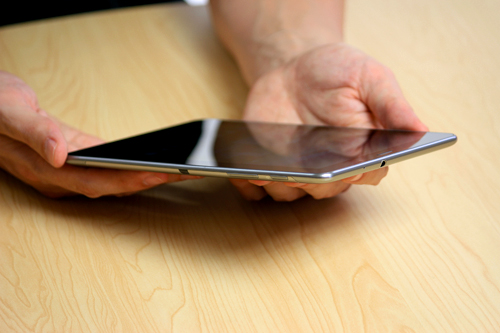
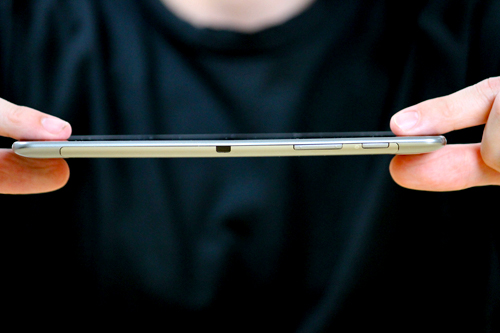
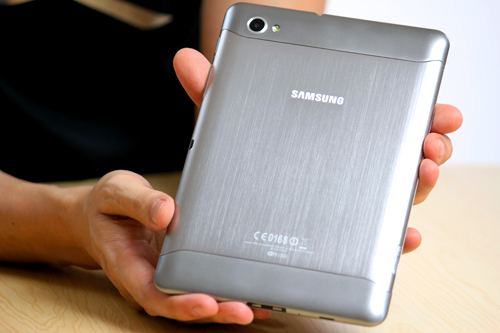
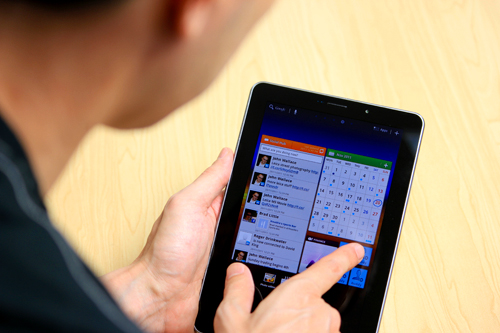
The Galaxy Tab 7.0 Plus sticks with the design characteristics established by the Tab 8.9 and 10.1. Although it’s not the sleekest (0.39” thick) of the bunch, it’s still compact enough to hold with one hand, and at the same time, it’s sturdy in build to instill us with some confidence of durability against the elements. Yes, it might appear to be a metallic exterior, but in fact, it’s nothing more than a plastic casing, which contributes to its lightweight figure (12.17 oz).

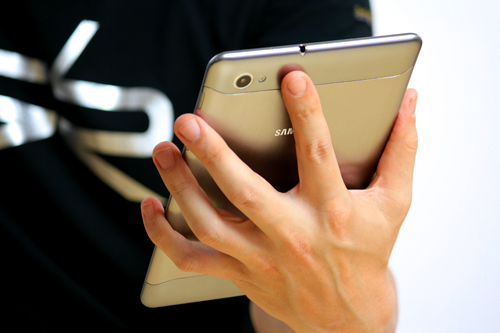
The Samsung Galaxy Tab 7.0 Plus is compact enough to hold with one hand - Samsung Galaxy Tab 7.0 Plus Review

The Samsung Galaxy Tab 7.0 Plus is compact enough to hold with one hand


Samsung Galaxy Tab 7.0 Plus Review

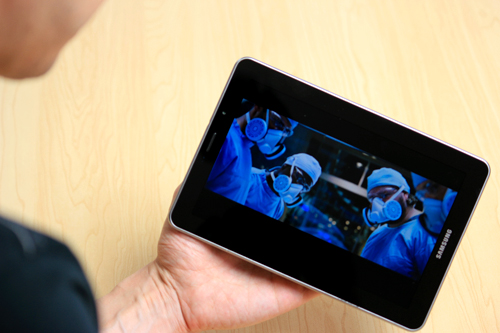
We’ve been fond of the PLS LCD displays used by Samsung’s recent line of Galaxy Tabs, and rightfully so, we’re feeling a bit of the same way with the 7” 1024 x 600 PLS LCD display being used by this one. The resolution is right there with the rivals as it’s able to produce tolerable and distinguishable details. Naturally, some might be taken back by Samsung’s choice to use a PLS LCD display, especially when the Galaxy Tab 7.7 features an AMOLED panel, but we’re grateful to find its color reproduction to be on the natural and realistic side – as opposed to the overly saturated tones exhibited by AMOLED.

The Samsung Galaxy Tab 7.0 Plus uses a 7” PLS LCD display - Samsung Galaxy Tab 7.0 Plus Review

The Samsung Galaxy Tab 7.0 Plus uses a 7” PLS LCD display


One can easily confuse the tablet to be a super-sized smartphone, namely because of the narrow earpiece and front-facing 2-megapixel sitting above its display when it’s held in portrait.

Samsung Galaxy Tab 7.0 Plus Review
2-megapixel front-facing camera - Samsung Galaxy Tab 7.0 Plus Review

2-megapixel front-facing camera


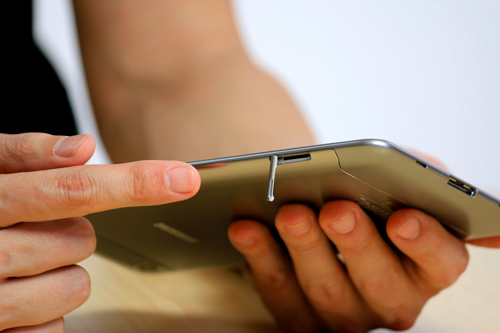
Along the left side of the device there are a microSD slot, and a SIM card slot if you happen to pick up the cellular enabled version of the tablet.
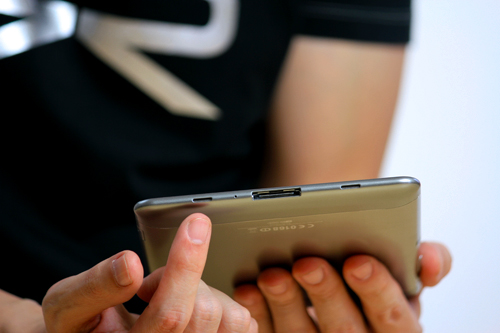
Another peculiarity is found on the right side, where we have an infrared port, which combines with the Peel Smart Remote app to offer us some light home theater functionality. Finally, Samsung continues to utilize a proprietary charging port for its tablets, which is very similar to that 30-pin connector found with all iOS devices. So, don't think you'll get away with your trusty microUSB cable.

Charging port (bottom) - Samsung Galaxy Tab 7.0 Plus Review
microSD and SIM card slots (left) - Samsung Galaxy Tab 7.0 Plus Review
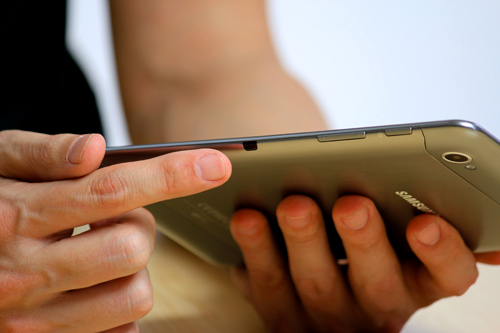
3.5mm jack (top) - Samsung Galaxy Tab 7.0 Plus Review

Charging port (bottom)

microSD and SIM card slots (left)

3.5mm jack (top)


Turning our attention to the rear of the tablet, we’re again seeing it sporting the same 3.2-megapixel auto-focus camera with LED flash used by its siblings.


Samsung Galaxy Tab 7.7

Samsung Galaxy Tab 7.7 WiFi+3G P6800 16GB


The 7 inch Android tablet market has been rather hit and miss so far, with the first iteration of the Galaxy Tab being the only real contender and most of the focus on the 10” category, and for good reason – that’s been the mainstay of Apple’s iPad up till now, and manufacturers have been innovative and creative with their offerings in order to stay relevant and have a chance of competing in that space.

The Galaxy Tab 7.7 takes a completely different tact, being lighter and slimmer than, well, any Honeycomb-based tablet we’ve seen so far. Compared to the original Tab which relied on a reworked mobile phone OS, it’s a much more mature product and fits snugly between a smartphone and large screen tablet. This may actually be the product to redefine what a small screen tablet is capable of.

Small, sleek and ready to slip into any size handbag or pouch.

Spec-wise, the Galaxy 7.7 is powered by a dual core 1.4GHz processor with 1GB of RAM, and will apparently come in three flavours – 16GB, 32GB and 64GB. It has N wireless on board, Bluetooth 3.0 and has a built-in GPS.

Samsung’s new 7 inch Android tablet sports a slightly larger screen, at 7.7 inches, but offers the exact same resolution features as its 10” cousins – 1280 x 800. Combine that with the Super AMOLED Plus screen, and you’ve got gorgeous detailed images and bright, rich colours. Because the pixels are so densely packed together, the screen display is second-glance-worthy. The small amount of video files we had played back smoothly in high definition.

Video playback up to 1080p on the Galaxy Tab 7.7.

I really haven’t held a tablet as light as this one. It’s only 340 grams, but it’s hard to describe what that means after holding various iOS, Android and Windows tablets – sure, this one is smaller than they are in terms of size, but the experience of holding one is amazing. I once commented in an earlier article how I’ve injured myself by falling asleep and dropping a first gen iPad on my face while reading… you’re in no danger of self-mutilation or embarrassment here.

Audio is pumped through these stereo speakers either side of the proprietary connector.

Did I mention how thin the Galaxy Tab 7.7 is? We’ve seen the Transformer Prime come in at 8.3mm, but the 7.7 takes “slim” to yet another level – it’s a sliver of a tablet at 7.89mm. To pick it up and rotate its dimensions in your hand is quite the chuckle producer – you don’t believe how thin and light it actually is.

Ridiculously thin... The Galaxy Tab 7.7 is lighter and thinner than pretty much any tablet on the market.

This is definitely a one-handed tablet – your fingers do need to spread, but you can also cup your fingers and hold it for a long time without fatigue. The cool metal backing does equalise with your hands temperature after a while, but put it down and the cold feel of stainless steel will once again greet your fingertips.

That’s a great segue into the materials and construction of this latest Samsung Galaxy Tab. Some other 7 inch Android tablet offerings have been rather thick, and felt a little fragile – squeeze the body and creaks have been heard from lesser machines. The engineering on the 7.7 is superb, we could detect no give between the body and screen; they are almost fused together. The metal back provides a stiffness and therefore top-shelf handling experience.

Maybe it's my long fingers that make this pic look odd... In any case the Galaxy Tab 7.7 is easily held in one hand, piano fingers or not.

Walking around this tiny pocket rocket and you can see how Samsung have achieved this degree of slimness: like the iPad and its own family of tablets, the Galaxy Tab 7.7 keeps ports down to an absolute minimum. All we have are a headphone jack, a micro SD card slot and Samsung’s proprietary 30-pin connector. Where most tablets try to offer a complete solution with inputs and outputs, particularly to differentiate against the iPad, the 7.7 follows its own path and offers instead adapters that can be fitted to connect various outputs.

Blink and you'll miss it... An external port on the Galaxy Tab 7.7, in this case a Micro SD Card Slot.

Is that going to be an issue for users? Based on the interest in the 10.1, which offers the same limited connectivity, no. It’s actually more sensible for this Galaxy Tab to eschew those I/O burdens as it’s probably closer to a smartphone than a tablet in some respects (the screen is actually a larger clone of the Galaxy S II). The option is there but you have to really feel the need in order to go to the effort of purchasing an adaptor.

The brushed metal back provides great rigidity to the Galaxy Tab 7.7.

Like all other HoneyComb tablets, there is a front and back camera setup, with a 2 megapixel camera on the front and 3 megapixel camera on the back. The back camera has an LED flash and 720p HD video recording capability. I think there is an inverse proportional relationship of the number of shots taken on a tablet to the size of the screen. Because the 7.7 is so light, it’s much easier to be spontaneous and shoot some off-the-cuff pics and video.

3MP camera and LED flash... The smaller the tablet, the more this will get used.

There is one black dot on the Galaxy Tab 7.7, but its existence helps give it a gold star for functionality. The black dot (not figuratively speaking, an ACTUAL black dot) on the side of the 7.7 is an infra-red transmitter. There is a program pre-installed on the 7.7 called Peel, and it actually converts the 7.7 into a universal remote control. If you’ve ever found remote controls to be clunky or not really that helpful, Peel may change your view on that.

Now not only do I not have to get up to change the channel, I don't even need to find the remote. She says lazy, I say efficient.

Setting it up is a breeze, and so is the actually use, just point at the device you’ve programmed in and it’s as if you’re using the original remote. But this functionality is a stunner, because you can browsing, reading or playing a casual game, use Honeycomb’s built-in multitasking to switch to Peel, change the channel/volume/input, and switch back to your previous activity, and the 7.7 never leaves your hands.

Software-wise, the Galaxy Tab 7.7 uses the same Touch Wiz overlay that their smartphones use, making the transition for Galaxy phone users a no-brainer. There is improved software such as video editing, image editing and even image management, letting you sort by a range of different criteria such as size, location (if geotagging can be found) or date/time.

Galaxy S II users will find no trouble using the Galaxy Tab 7.7.

The Galaxy also retains the “Hub” areas of the smartphone, and apparently the Music Hub will be available soon as well, but only for music, not for videos. I tried the Social Hub out and I liked its aggregation of my different social feeds in one easy to view panel. Being Honeycomb, this is a live widget that updates on screen so you can snack on bite-sized pieces of your connected world.

Manage all your social feeds into one panel on the Galaxy Tab 7.7.

The 7 inch Android tablet market is not as big as the 10 inch segment, by any means. It looks like Samsung has managed to carve itself a little niche with a product that doesn’t rely on third party programs to succeed, and adds little quirky features like remote control and revamped image/video apps into its sleek shell to give users a true out-of-the-box experience.

Best Price Samsung Galaxy Tab 7.7 WiFi+3G P6800 16GB is $599.99


Source : http://ritchiesroom.com

Wednesday, March 28, 2012

Top 5 upcoming tablets

Eyeing the increasing competition, we may also expect manufacturers to keep the prices of expected tablets reasonable. Despite lower than expected sales, Android tablets remain hot favorites of the handsets vendors - this further gains ground if we look at the number of tablets lined up for launch this year.
Moreover, these new tablets are likely to come with better design and features. Eyeing the increasing competition, we may also expect manufacturers to keep the prices very reasonable.

Sony Tablet P:

Launch time: February 10th -15th in India.
Design and build Quality: The biggest USP of this tablet is its form factor. It has two screens measuring 5 inch each; together they give you 10 inch space and when folded gives you a form factor of a large smartphone. How it performs in the market is something that needs to seen but this PSP (Playstation) certified certainly has a lot going for it.
Features and Specifications: Under the skin, this tablet houses a dual-core Nvidia Tegra 2 mobile processor and runs on Android Honeycomb OS. Sony P has a 5 megapixel camera at the back and a 0.3 megapixel camera in the front. It has quite a unique design and the interface is programmed to use both the screens combined and individually. The device is with both 3G and WiFi connectivity and build in around 4 GB of internal memory.


Asus Transformer Prime TF201:

Launch time: In February.
Design and build Quality: This awesome tablet has unique form factor. Like its predecessor, Asus Transformer, this tablet has a keyboard docking station which transforms it into a laptop.
Features and Specifications: Transformer Prime TF201 features a 10.1 inch touchscreen display. It houses a quad-core Nvidia Tegra 3 mobile processor and will run on Android 3.2 Honeycomb, though Ice Cream Sandwich update already lined up for it. In terms of connectivity also, the tablet is fully loaded with 3G, WiFi, Bluetooth etc


.

Samsung Galaxy 7.7:

Launch time: Samsung Galaxy 7.7 to be launched in a couple of months.
Design and build Quality: This tablet will come with a 7.7 inch Super Amoled Plus display supporting 1280x800 pixel resolution. Inside, it would pack a dual core 1.4 GHz microprocessor with Mali-400MP graphics chip to power the Android 3.2 Honeycomb operating system.
Features and Specifications: Samsung has added Universal Remote Controlfunctionality in Galaxy 7.7 that will let you control your television as well as home entertainment systems through your tablet.
Samsung Galaxy 7.7 will support SIM calling and has a 3 megapixel camera at the back while a 2 megapixel one will be there in its front. It supports 3G and WiFi and will come in 16 GB, 32 GB and 64 GB storage options along with support for micro SD card of up to 32 GB capacity.


Acer Iconia A200:

Launch time: Its yet to be announced, we expect it to be launched by March.
Design and build Quality: This one is a mid range 10 inch tablet from Acer. It boasts a 10.1-inch display with a native resolution of 1280x800 pixel, and has a dual-core Nvidia Tegra 2 processor with an integrated low-power GeForce graphic chip which is capable of playing 1080p HD videos.
Features and Specifications: The tablet runs Android 3.2 Honeycomb operating system and will be upgraded to Android 4.0 later. In the front, Acer has only 2 megapixel front camera for HD video chats.
Acer Iconia A200 has a full USB 2.0 port, which means that it will support 3G dongles. The Iconia Tab A200 doesn't offer SIM slot and is entirely dependent on the WiFi for Internet connectivity. Bluetooth, GPS are there. It has also dual speakers for good audio experience.

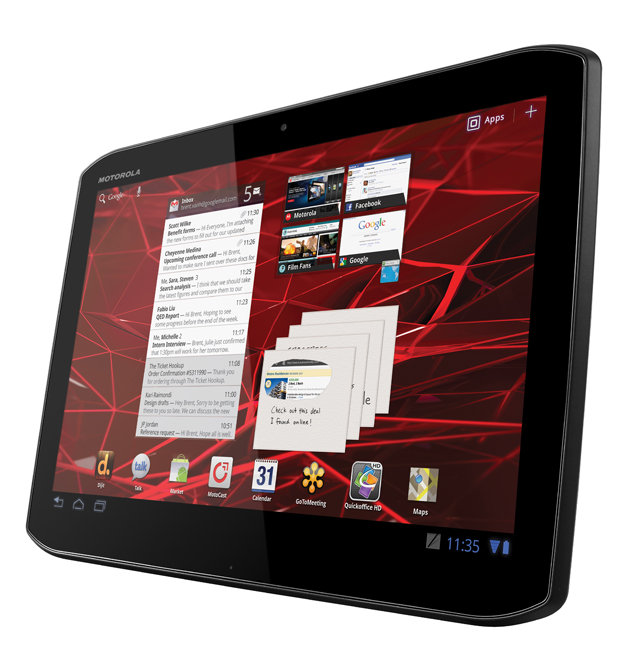
Motorola Xoom 2:


Design and build Quality: The Xoom tablet did not get the cash register ringing for Motorola. However, the company will be hoping to change this with the upgraded Xoom tablet that is loaded with many interesting features and a stylish design.
There are two versions of the Motorola Xoom 2 tablet with screen sizes of 8.2 and 10.1 inches, but both have the same display resolution of 1280 × 800 pixels and even the same hardware.
Features and Specifications: The 10.1 inch Xoom 2 has a detachable key board as an accessory. Motorola has also included Infra-red in the tablets that helps it work as a universal remote for all your gadgets. Other connectivity options are present in full force.
Motorola Xoom 2 tablet with screen sizes of 8.2 and 10.1 inches Both tablets have an LTE version and a WiFi only version. Apart from that they use a 1.2 GHz dual core processor and run on Android 3.2, which will be upgraded later.


Wednesday, March 21, 2012

Apple iPad 2 Review

The Apple iPad 2 is neither a revolution nor a revelation. Rather, it's an evolutionary bump over its predecessor, which is enough for iPad 2 to be competitive with, and stay ahead of, its tablet competition, even if only by a hair. While the iPad 2 still leaves much room for improvement, it delivers a largely satisfying tablet experience at an appealing price (in 18 variants, starting at $443 for a 16GB, Wi-Fi-only version).


The iPad 2's industrial design follows the model established with the first-generation iPad and with the iPhone 4: The 9.7-inch display dominates the device, with a home button on front, a volume rocker and slider switch on the side (now usable as either a mute button or rotation lock, your choice), and a power button up top. The back and sides continue to be anodized aluminum--a design trait that enables Apple's new Smart Cover (in 12 colors and two materials; prices start at $39.95) to attach on the underside using magnets, and to flip over the display to "smartly" lock and unlock the screen. Nifty. Regrettably, the aluminum back is highly prone to scratches--so if you don't put some sort of protective sheath over the back, you're bound to end up with scratches just from putting it on a surface.
Compared with the original, the iPad 2 is physically streamlined: At 0.34 inch deep, it's thinner than the original's 0.5 inch, and its chassis is now surround by tapered edges, which make it easier to hold. The tablet weighs 1.33 pounds (Wi-Fi version; the AT&T and Verizon models weigh 0.01 and 0.02 pounds heavier, respectively, to accommodate the 3G radio). The 12 percent to 17 percent weight reduction as compared to the original iPad--which weighed 0.17 and 0.26 pounds more for the Wi-Fi and AT&T 3G varietals--truly does make a difference, particularly when holding the tablet in one hand. And you will use any tablet one-handed: Anytime you don't use the tablet when resting on a surface, you'll at some point have to hold it one hand while you use the other hand to navigate the screen. While the change in weight isn't enough for me to say I'd hold the iPad in one hand for reading a book for an hour, I found it did make the one-handed general operation much more pleasant and viable. And I found the difference in weight very obvious compared with the Motorola Xoom, an Android 3.0 tablet that weighs 1.6 pounds.
This model's tapered edges provide a single unibody-style design, leading to a flat back (the first-gen iPad had a slightly curved back that left it wobbly on a surface). The buttons are now located along this curve, as is the dock connector. Though I had no issues with the button placement, the curve repeatedly made it challenging for me to properly align and insert the cable into the port.


The tapered edges also required moving the speaker. Previously, it was located flush on the bottom bezel, facing downward. Now, it's along the taper, running about half an inch up to the back. The new location gives you a chance of getting audio even if you rest the tablet directly with the bottom edge on your lap (before, audio would be muffled in this position). But now, audio can be muffled if you lay the tablet flat on its back and expect to hear output from the speaker. The speaker still sounds tinny and barely passable, but it's there if you need it. For better audio, flip that Smart Cover around to the back; the audio will reflect off the cover, amplifying the sound.

Like its predecessor, you won't find any ports, slots, or connectors (beyond the 30-pin dock connector and the headphone jack). Video-out is handled via a bulky but effective dock connector to HDMI cable.

Display:
While the iPad 2's display is one of the best I've seen on any tablet in use today, it still disappoints. Here's why. The display is unchanged from the first-generation iPad: It's bright, with 1024-by-768-pixel resolution, at 132 pixels per inch. After using an iPhone 4 for the better part of the past year, though, I couldn't help but wish we had the Retina Display (960 by 640 resolution at 326 pixels per inch) on the iPad instead. I've seen some reports that say the display is comparable to the iPhone 4's, but I find that the sharpness of both images and text suffers on the iPad 2 versus the iPhone 4.

Text, in particular, is a sore point for me: The pixelation and fuzziness in many fonts--including the font for the icon labels, and the standard text I see in the Web browser or in iBook--borders on unbearable, in the same way that I cringe when I go back to my iPhone 3GS after using my iPhone 4. I imagine that some of these complaints could be solved by better antialiasing in the iOS operating system to compensate for the lack of native resolution, but no such tweak is evident in the version of iOS shipping on the iPad 2 (iOS 4.3).

Those complaints aside, in comparison with the Motorola Xoom and the (7-inch) Samsung Galaxy Tab, the iPad 2 display more than holds its own. Of the three, the Tab has the sharpest text and images, but its colors are oversaturated. The Xoom is fuzzy, and suffers from similar antialiasing issues in text--despite its higher-res 1280 by 800 display. Though the iPad 2 has issues with fuzzy, pixelated text, too, it's colors are pleasingly balanced and accurate, and images are reasonably sharp.
Performance

The guts of the iPad have been stepped up to include 512MB of RAM (twice the RAM of the original iPad), a 200-MHz bus, and the new dual-core A5 chip. The inclusion of a dual-core CPU was necessary; competing Android 3.0 tablets all use a dual-core chip. The RAM on the iPad 2 is half that on the Android models, but whether this will truly impact usability or is merely a reflection of Apple's home-team advantage as both hardware and operating system manufacturer remains to be seen.

Our performance tests showed the iPad 2 completed the Sunspider 0.9.1 Javascript test in 2.1 seconds. That result is full 1.2 seconds faster than the iPad 1, and was twice as fast as the iPhone 4. Moreover, the iPad matched the Android 3.0, dual-core Tegra 2-based Motorola Xoom, and it was three times as fast as Samsung's single-core Galaxy Tab. The iPad 2 hammered the Motorola Xoom in startup time; it was 43 percent faster, requiring just 26 seconds to the Xoom's 46 seconds.

I didn't need a benchmark result to confirm the zippier feel of iPad 2. Some things didn't feel especially different (like swiping between home screens), but scrolling in iTunes felt faster, as did navigating photo galleries, for example. And I found the iPad 2 could actually keep up with my fast, touch-typist fingers; neither iPad 1 nor Xoom could do so.

The Cameras:
The iPad 2 adds both front and rear-facing cameras, for use in FaceTime chats and for video and still capture. Sadly, Apple's approach to cameras in iPad 2 feels cursory, as if the cameras are there just as a checkbox item; the company hasn't made tweaks, or included good enough hardware, for either camera to produce a truly satisfying experience. That stands in stark contrast to Apple's approach with the 5-megapixel, 720p iPhone 4 camera (which has satisfactorily captured over 3000 images and videos, and counting).

My casual snaps with the iPad 2 proved not worth the trouble; I'd only use the camera if I had no other available. This isn't surprising, since Apple doesn't state a spec for its rear-facing camera for still images, and in PCWorld's photo tests, the iPad 2 scored a Poor, in line with what the iPod Touch scored for its camera. By comparison, the iPhone 4 scored at the high end of our Fair rating, besting both the Motorola Xoom and the Samsung Galaxy Tab.

The iPad 2 did do better than the Tab on video, and performed comparably to a Cisco Flip Ultra HD 2HR, earning a rating of Fair. For video, the camera can capture 720p HD, at up to 30 frames per second. The front-facing camera also underwhelmed. It's rated at just VGA (640 by 480 pixel resolution), and as such, I found video looked pixellated during Facetime video chats with another iPad user over Wi-Fi.

Another gripe: Apple doesn't endow its cameras with any additional controls to enhance image capture. Furthermore, iOS 4.3 doesn't do anything to adjust the location of the camera's capture button on screen, so it's positioned at horizontal right center, as, oddly, it is on the iPhone. Without repositioning, most hands will have difficulty reaching the capture button (in horizontal orientation, in falls to the lower center of the screen--nowhere near where you fingers will be holding the tablet at the left/right edges).

iOS 4.3 and Software:
Apple has done little to push iOS's evolution. While this is disappointing, given its recent updating patterns that's not entirely unexpected: The company has announced major new iOS revisions at its Worldwide Developer's Conference, and released those updates tied to iPhone's summer bump first (last year, iPad didn't get its big iOS update until fall).

But the incremental updates in iOS 4.3--while welcome (hooray for choosing whether the switch on iPad's side is a mute button or a rotation lock, and for providing Home Sharing)--are frustrating. They do nothing to refresh or improve upon iOS, and that's something that feels necessary in the face of the pressure coming from competing operating systems on current and forthcoming tablets (Google's Android 3.0, HP's WebOS, and RIM's PlayBook OS). Notifications, widgets, and multitasking are all topics that need revisiting now that Apple's iPad is no longer the only tablet around (at least to speak of).

Likewise, Apple's reliance on iTunes to facilitate all data transfers and backups is getting increasingly tiresome. On Windows, iTunes is more kludgy and more limiting than it is on Macs; and ultimately, it's wrong to require consumers to connect a tablet to a PC for basics like data backup and software updates, especially if the tablet is supposed to replace the computer.

One point worth noting about software: The iPad has 65,000-plus apps that are optimized for its large screen. While we've seen much interest in Google's Android, both from game makers and others, Android 3.0's tablet apps, at this point, rank only in the hundreds (optimistically), not thousands. I believe Android 3.0 app development will ramp up considerably in the next six months, just as app development stepped up rapidly for Android 2.X smartphones; but, if you're after a breadth of apps today, be aware that Android--at least for version 3.0--is a still-evolving marketplace.

Battery Life:
In my hands-on, I experienced no discernible difference in battery life compared with the iPad 1. Macworld's battery life tests confirmed this real-world usage impression; there, the 32GB iPad with AT&T 3G lasted 504 minutes, just 14 minutes longer than a 16GB iPad 1 with AT&T 3G. After using the Motorola Xoom, however, I must say I found the iPad 2's lengthy recharge time highly annoying: Compared with the Xoom's rapid recharge, the iPad 2's wall-connected recharge seemed to progress at a trickle.

Pick an iPad 2:

Apple provides no fewer than 18 different variations of the iPad 2, with the differentiators tied to color, capacity, and connectivity. You have a choice of white or black, Wi-Fi-only or Wi-Fi/3G on either AT&T or Verizon. The capacity options remain unchanged from last year: 16GB, 32GB, and 64GB.

And the prices corresponding to those capacities also remain unchanged: $499, $599, and $699. Add another $130 for the Wi-Fi/3G version, regardless of the carrier you choose. The 3G models have one cosmetic difference versus the Wi-Fi models--a black piece of plastic at the top, to enhance 3G reception.

The iPad 2 is the first Apple tablet to come in black and white varietals. Although some might consider the white to be the epitome of Apple chic (as on the iPhone), on the iPad you might want to think twice before getting the white bezel. Unlike the iPhone, where the white is really limited to the outside of the device, here the white is the bezel surrounding the display. And as on other e-readers and televisions, the display can be harder to read, and you'll have a perception of less pop and poorer contrast compared with a black bezel.

Should You Buy an iPad 2?
No question that the iPad 2 lacks some elements that would make it a complete package. It has no built-in hotspot, it's cameras are weak, and the OS needs better notifications and greater flexibility for file handling and updating without a computer.

If you're considering upgrading from the iPad 1, you'll see your most satisfying boosts in the lighter weight and zippier performance. Gamers will want the new model for its graphics handling, which is improved thanks to the new processor design.

If you're in the market for a tablet today, though, iPad 2 remains the class act to beat. Yes, it has limitations and omissions in its hardware, but on balance, it is the tablet that is best prepared, right now, for the mass-market consumer. The question that remains to be seen is whether iPad 2 can hold its crown for a year, as its predecessor did.

Source: PC World